Integrated 5G SA FWA
Magma 5G SA feature enables operators to provide enhanced Mobile BroadBand services and opens up new oppurtunites for business.
This document gives an overview of the 5G SA functionality present in Magma, its architecture, configuration, feature matrix and general debugging techniques.
Architecture
Currently, fixed wireless access deployment is targeted as the first milestone for 5G SA.
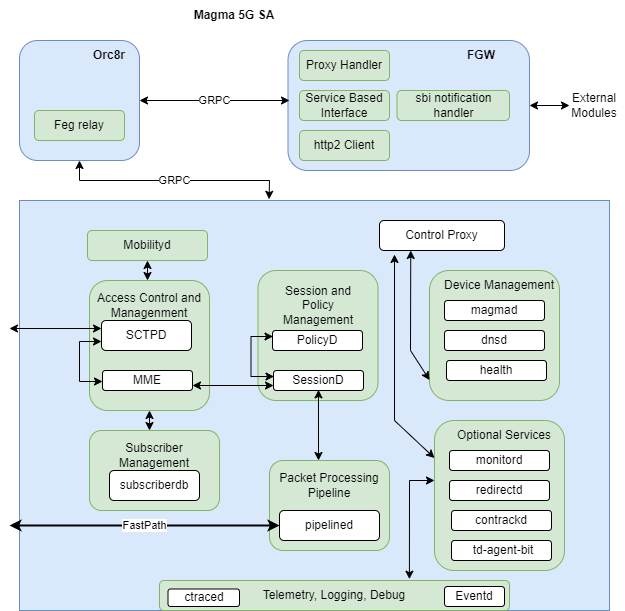
AMF included in current MME module and will serve as entry point for all the N1 and N2 messages coming from CPE and GNB. Post processing of these messages AMF will connect with existing subscriberdb, mobilityd and sessiond module for realizing the end to end call flow.
Following diagram gives an overview of the 5G SA components.
Prerequisites
Before starting to configure 5G SA setup, first you need to bring up a setup to handle your own/local subscribers. So before configuring Inbound Roaming you need:
- Install Or8cr,
- Install Federation Gateway and,
- Install Access Gateway.
- Make sure your setup is able to serve calls with your local subscribers
Once you are done you need to enable the 5G feature set from the orchestrator. Also need to ensure that this AGW serves the mapped PLMN.Once done we can connect Magma AGW with GNB and the 5G supported UE.
High Level Call Flow
Following figure describes the high level call flow in Magma for 5G.
UE/CPE basic registration Flow
Basic PDU session establishment call flow
Service Request Procedure (from UE/CPE) call flow
Paging procedure call flow
Features supported by 5G SA
Following are the feature set which are available as part of current release
- Mobile Management Services (Registration, Deregistration, Authentication etc procedures)
- Session Management Services (PDU Session Establishment, Accept etc)
- Service Related procedures via CPE
- Idle Mode and Paging support
- Basic traffic flow
Configuration 5G SA feature
Enabling / Disabling the 5G Feature set
5G feature can be disabled or enabled using swagger API for an LTE Network under Cellular section
Swagger API : PUT - /lte/{network_id}/cellular/epc
Below is the payload
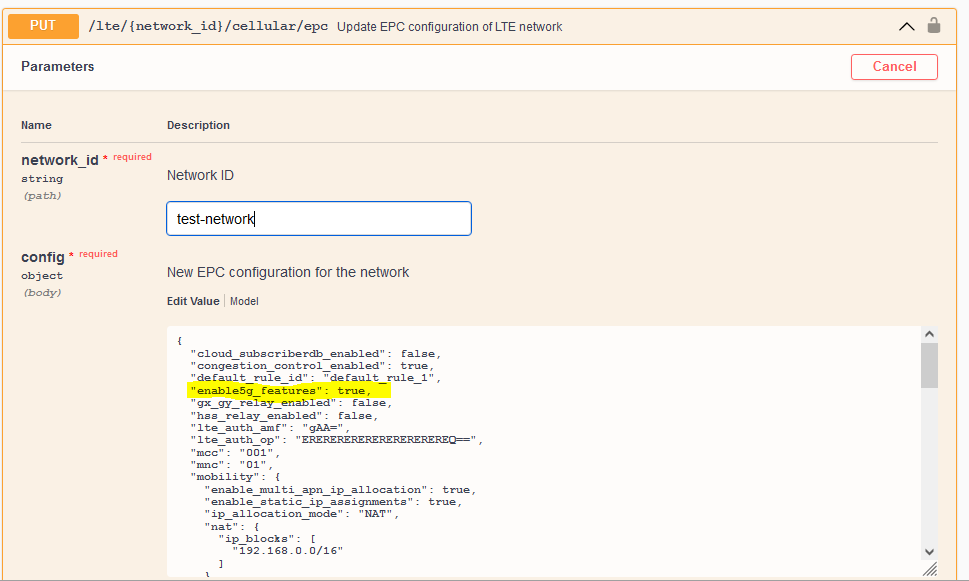
After a successful configuration gateway.mconfig should looks something like :
  "mme": {
    "@type": "type.googleapis.com/magma.mconfig.MME",
    "amfDefaultSliceDifferentiator": "ffffff",
    "amfDefaultSliceServiceType": 1,
    "amfName": "MAGMAAMF1",
    "amfPointer": "0",
    "amfRegionId": "1",
    "amfSetId": "1",
  ...
  ...
  "enable5gFeatures": true,
  ...
  }
  "pipelined": {
    "@type": "type.googleapis.com/magma.mconfig.PipelineD",
    "allowedGrePeers": [],
    "apps": [],
    "enable5gFeatures": true,
    ...
    "upfNodeIdentifier": "192.168.60.142"
  },
  "sessiond": {
    "@type": "type.googleapis.com/magma.mconfig.SessionD",
    "enable5gFeatures": true,
    "gxGyRelayEnabled": false,
    "logLevel": "INFO",
    "relayEnabled": false
  },
  "subscriberdb": {
    "@type": "type.googleapis.com/magma.mconfig.SubscriberDB",
    "enable5gFeatures": true,
    ...
    ...
  }
Subscriberdb Extension
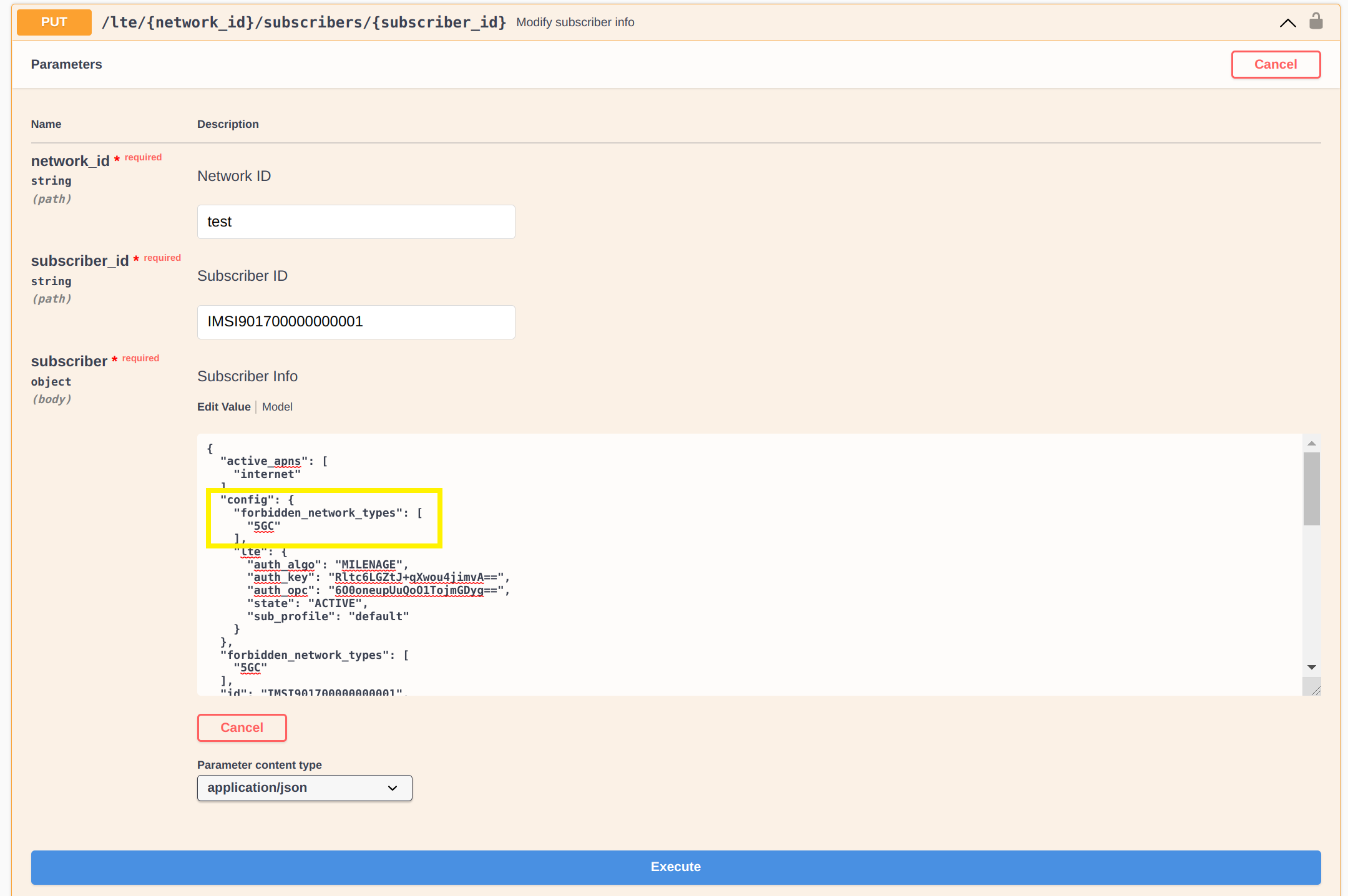
The basic subscriber configuration remains unchanged and can be added following the link. However a small extension was introduced, called core network type restriction in order to give permission flexbility to operators to disable 5G or 4G features for a particular subscriber.
The sample configuration is shown in the below figure
Additional AMF Specific Configurations
AMF Specific Configuration
The parameters related to AMF like slice configuration, setid, regionid etc can be configured using swagger APIs. Following shows the mechanism to configure it using the swagger APIs
  PUT/GET - /lte/{network_id}/gateways/{gateway_id}/cellular/ngc (Gateway NGC Configuration)\
  {
    "amf_name" : "amf.example.org",
    "amf_set_id" : "2A1",
    "amf_pointer" : "1F",
    "amf_region_id" : "C1",
    "amf_default_slice_service_type" : 2
    "amf_default_slice_descriptor" : "AFAF"
  }
If not configured these parameters have their own default values.
Test and troubleshooting
Additional Logging
It is recommendable that before running the tests, enable some extra logging capabilities in Access Gateway to trace the call. For better details in Access Gateway logs:
- Enable
log_level: DEBUGinmme.yml,sessiond.ymlandsubscriberdb.yml - Enable
print_grpc_payload: Trueonsubscriberdb.yml,sessiond.yml&pipelined.yml - Restart magma, so the changes are taken
- See the logs using
sudo journalctl -fu magma@mmeor sudojournalctl -fu magma@subscriberdborsudo journalctl -fu magma@sessiond
Restart magma, so the changes are taken See the logs using sudo journalctl -fu magma@mme or sudo journalctl -fu magma@subscriberdb or sudo journalctl -fu magma@sessiond
Common Issues and Troubleshooting
SCTP Connection Failure
-
Description :- NG Setup failure due to SCTP connection (like connection not established)
-
Cause / Solution :- One of the common cause for this the 5G Feature is not enabled properly from the swagger For checking the same
   vagrant@magma-dev-focal:~/magma/lte/gateway$ cat /proc/net/sctp/eps
     ENDPT     SOCK   STY SST HBKT LPORT   UID INODE LADDRS
         0        0 2   10  9    36412     0 465001933 192.168.60.142
         0        0 2   10  25   38412     0 465001935 192.168.60.142
Entry of port 38412, ensures that the 5G feature is up and related applications are launched.
NG Setup Failure
-
Description :- NG setup connections are failing within the network, which means that the gNodeb’s are not able to get provisioned with this network.
-
Causes / Solution :- Common causes are plmn mismatch and nssai mismatch. Please check the mme.log (/var/log/mme.log) to get the exact cause.
UE Attach Failure
-
Description :- Ue is unable to attach to the network.
-
Causes / Solution :- Common causes for this failure is authentication failure. Please check the mme.log (/var/log/mme.log) to get the exact cause. In case of authentication failure, please verify that authentication parameters (such as key and opc) are the same in ue and subscriberdb.
Enable the feature in Headless features
In case if the Magma is installed in a headless mode the following variable needs to be set to true in the files mme.yml, pipelined.yml, sessiond.yml, subscriberdb.yml
enable5g_features: true
3GPP References
- N1 Interface is based on 3GPP TS 38.413 version 16.2.0 Release 16
- N2 Interface is based on 3GPP TS 24.501 version 15.3.0 Release 15
- Procedures fo 5G Systems 3GPP TS 24.501 version 15.4.1 Release 15
- N3 Interface is based on 3GPP TS 29.281 version 15.7.0 Release 15
- Security Procedures like key generations based on 3GPP TS 33.501 version 15.4.0 Release 15