Pipelined
Overview
Pipelined is the control application that programs rules in the Open vSwitch (OVS). In implementation, Pipelined is a set of network services that are chained together. These services can be chained and enabled/disabled through the REST API in orchestrator.
Open vSwitch & OpenFlow
Open vSwitch (OVS) is a virtual switch that implements the OpenFlow protocol. Pipelined services program rules in OVS to implement basic PCEF functionality for user plane traffic.
The OpenFlow pipeline of OVS contains 255 flow tables. Pipelined splits the tables into two categories:
- Main table (Table 1 - 20)
- Scratch table (Table 21 - 254)
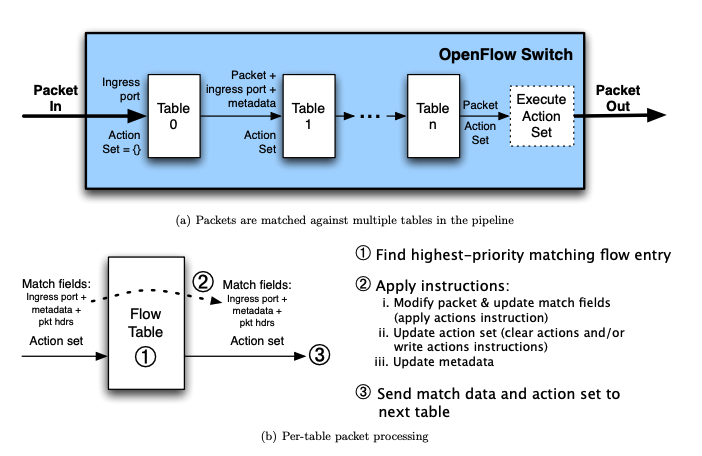
Source: OpenFlow Specification
Each service is associated with a main table, which is used to forward traffic between different services. Services can claim scratch tables optionally, which are used for complex flow matching and processing within the same service. See Services for a detailed breakdown of each Pipelined services.
Each flow table is programmed by a single service through OpenFlow and it can contain multiple flow entries. When a packet is forwarded to a table, it is matched against the flow entries installed in the table and the highest-priority matching flow entry is selected. The actions defined in the selected flow entry will be applied to the packet.
Ryu
Ryu is a Python library that provides an API wrapper for programming OVS.
Pipelined services are implemented as Ryu applications (controllers) under the hood. Ryu apps are single-threaded entities that communicate using an event model. Generally, each controller is assigned a table and manages the its flows.
Services
Static Services
Static services include mandatory services (such as OAI, ingress, middle and egress) which are always enabled, and services with a set table number. Static services can be configured in the YAML config.
    GTP port            Local Port
     Uplink              Downlink
        |                   |
        |                   |
        V                   V
    -------------------------------
    |       Table 0 (SPECIAL)     |
    |         GTP APP (OAI)       |
    |- sets IMSI metadata         |
    |- sets tunnel id on downlink |
    |- sets eth src/dst on uplink |
    -------------------------------
                  |
                  V
    -------------------------------
    |      Table 1 (PHYSICAL)     |
    |          ingress            |
    |- sets direction bit         |
    -------------------------------
                  |
                  V
    -------------------------------
    |      Table 2 (PHYSICAL)     |
    |            ARP              |
    |- Forwards non-ARP traffic   |
    |- Responds to ARP requests w/| ---> Arp traffic - LOCAL
    |  ovs bridge MAC             |
    -------------------------------
                  |
                  V
    -------------------------------
    |      Table 3 (PHYSICAL)     |
    |       access control        |
    |- Forwards normal traffic    |
    |- Drops traffic with ip      |
    |  address that matches the   |
    |  ip blocklist               |
    -------------------------------
                  |
                  V
   Configurable PHYSICAL apps managed by cloud <---> Scratch tables
            (Tables 4-9)                            (Tables 21 - 254)
                  |
                  V
    -------------------------------
    |      Table 10 (SPECIAL)     |
    |           middle            |
    |- Forwards uplink traffic to |
    |  LOCAL port                 |
    |- Forwards downlink traffic  |
    |  to GTP port                |
    -------------------------------
                  |
                  V
   Configurable LOGICAL apps managed by cloud <---> Scratch tables
            (Tables 11-19)                         (Tables 21 - 254)
                  |
                  V
    -------------------------------
    |      Table 20 (SPECIAL)     |
    |           egress            |
    |- Forwards uplink traffic to |
    |  LOCAL port                 |
    |- Forwards downlink traffic  |
    |  to GTP port                |
    -------------------------------
        |                   |
        |                   |
        V                   V
    GTP port            Local Port
    downlink              uplink
Service types
Services(controllers) are split into two: Physical and Logical. Physical controllers: arpd, access_control. Logical controllers: dpi, enforcement.
Configurable Services
These services can be enabled and ordered from orchestrator cloud. mconfig is used to stream the list of enabled service to gateway.
Table numbers are dynamically assigned to these services and depenedent on the order.
    -------------------------------
    |          Table X            |
    |            DPI              |
    |- Assigns App ID to each new |
    |  IP tuple encountered       |
    |- Optional, requires separate|
    |  DPI engine                 |
    -------------------------------

    -------------------------------     -------------------------------
    |          Table X            |     |       Scratch Table 1       |
    |        enforcement          | --->|           redirect          |
    |- Activates/deactivates rules|     |- Drop all non-HTTP traffic  |
    |  for a subscriber           |     |  for redirected subscribers |
    |                             |<--- |                             |
    |                             |     |                             |
    -------------------------------     -------------------------------
                  |
                  |                     -------------------------------
                  --------------------->|       Scratch Table 2       |
                                        |      enforcement stats      |
                                        |- Keeps track of flow stats  |
                                        |  and sends to sessiond      |
                                        |                             |
                                        |                             |
                                        -------------------------------
Reserved registers
Nicira extension for OpenFlow provides additional registers (0 - 15) that can be set and matched. The table below lists the registers used in Pipelined.
| Register | Type | Use | Set by |
|---|---|---|---|
| metadata | Write-once | Stores IMSI | Table 0 (GTP application) |
| reg0 | Scratch | Temporary Arithmetic | Any |
| reg3 | Scratch | Temporary Arithmetic | Any |
| reg1 | Global | Direction bit | Table 1 (ingress app) |
| reg2 | Local | Policy number | Enforcement app |
| reg10 | Global | App ID | DPI app |
| reg4 | Local | Policy version number | Enforcement app |
| reg6 | Global | Passthrough flag | Ue Mac app |
| reg7 | Local | Vlan Tag | Vlan learn app |
| reg8 | Global | Tunnel port | MME |
| reg9 | Global | Tunnel ID | MME |
| reg12 | Local | Proxy Tag | HE |
| reg11 | Local | Session ID | 5G stats |
Resilience
Pipelined service is restart resilient and can seamlessly recover from service restarts. This is achieved by:
- Querying all flows on controller startup. This is done through a separate startup flow controller that will handle querying all initial stats.
- Comparing the flows received from step 1, with the flows obtained from sessiond setup() call
- Activating new flows that are not present
- Deactivate flows that are not in the sessiond call but are active This works because ovs secure fail mode doesn't remove flows whenever the controller disconnects.
Note: Currently we reinsert some flows instead of doing the diff logic on them(f.e. enforcement redirection flows as they need async dhcp request resolution, other tables that don't hold and session data(ingress, middle, egress, ue_mac, etc.) but this will be added later).
Testing
Scripts
Some scripts in /lte/gateway/python/scripts may come in handy for testing. These scripts should be ran in virtualenv so magtivate needs to be ran first to enter the virtualenv .
pipelined_cli.pycan be used to to make calls to the rpc API- Some commands require sudo privilege. To run the script as sudo in virtualenv, use
venvsudo pipelined_cli.py - Example:
- Some commands require sudo privilege. To run the script as sudo in virtualenv, use
./pipelined_cli.py enforcement activate_dynamic_rule --imsi IMSI12345 --rule_id rule1 --priority 110 --hard_timeout 60
venvsudo ./pipelined_cli.py enforcement display_flows
fake_user.pycan be used to debug Pipelined without an eNodeB. It creates a fake_user OVS port and an interface with the same name and IP (10.10.10.10). Any traffic sent through the interface would traverse the pipeline, as if its sent from a user ip (192.168.128.200 by default).- Example:
./fake_user.py create --imsi IMSI12345
sudo curl --interface fake_user -vvv --ipv4 http://www.google.com > /dev/null
Unit Tests
See the Unit Test README for more details.
Integration Tests
Traffic integration tests cover the end to end flow of Pipelined. See the Integration Test README for more details.