L3 transport for SGi
Status: Draft
Authors: Pravin Shelar
Reviewers: Magma team
Last Updated: 2021-8-15
Objective
Add support for tunnel from AGW (SGi interface) to aggregator host.
Motivation
Today AGW operator need to have separate networking device to create the tunneling infrastructure for pushing SGi traffic to aggregator host. This scheme also needs separate public IP which is expensive to have these days. By providing support for tunneling traffic from AGW to aggregator host we eliminate both requirement and reduce operation cost of Magma AGW.
Other use cases
- L3 tunnel can be potentially used for routing traffic to PGW aggregator host.
- L3 tunnel can be used to connect to AGW from the aggregator host.
Design
Initially IPSec tunnel was considered for tunneling traffic to the aggregator
host. But after exploring other tunneling techniques it became clear that we
need to look at wireguard first. There are following advantages using wireguard
over IPSec tunnels
wireguardperforms better than IPsec or OpenVPN. There are a bunch of benchmarking results on internet[1].- It avoids dependency on OVS IPSec support.
- AGW can apply QoS (rate limiting) policies before egressing traffic on the tunnel.
wireguardAllows interface based L3 networking device, IPSec has this functionality, but it is limited and available on newer kernel. This allows simpler integration for the other use cases mentioned above.
So the plan is to implement wireguard based tunnel first and then implement
IPSec. This doc covers both tunnel implementation.
Wireguard Design
This feature has two important aspects
- Configuration of WireGuard tunnel
- Datapath programming
Configuration
AGW need following configuration for WireGuard tunnel
- Install required binaries for WireGuard Tunnel
- Enable or disable SGi Tunnel
- Type of SGi Tunnel,
wireguard, IPSec, etc - Tunnel configuration
- Peer Public IP address
- Peer Public Key.
- AGW
wireguardinterface IP
Datapath Programming for WireGuard Tunnel
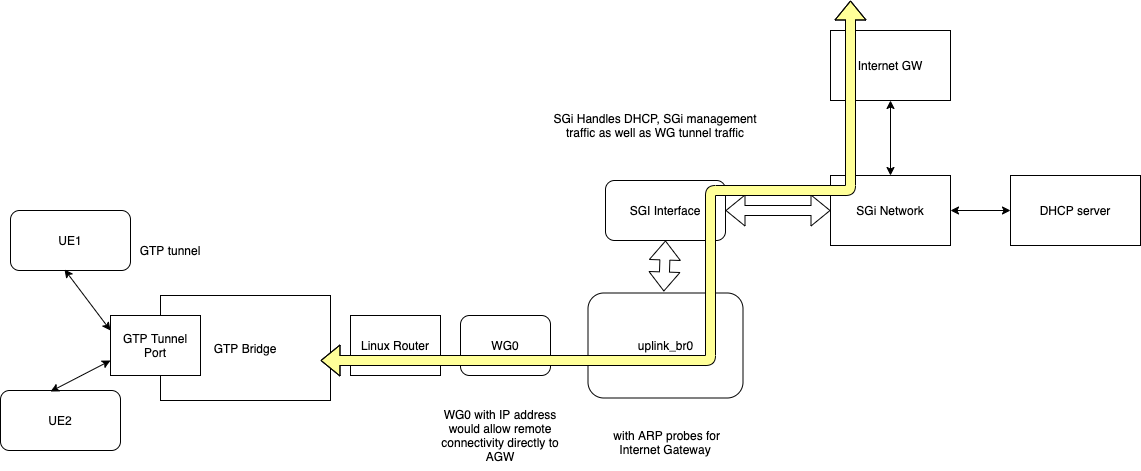
Magma data path programming for WireGuard Tunnel will involve the following steps
- Setup the
wireguardtunnel- Create the tunnel device
- Apply the configuration from magma config
- If the
wireguardkey is not provided generate the GW key - export the key over directoryD for operator visibility.
- If the
- Tunnel local IP address, this would allow remote ssh/connectivity directly to the AGW from aggregator.
- Store the configuration on persistent device.
- Link the configuration to systemd to have the device configured on boot up.
- Setup the tunnel for NAT traversal.
- IP Address allocations for UE:
wireguardtunnel transport would support existing IP allocation schemes- IP-POOL or Static IP based UE IP allocation would work the best, since there would not be any need to configure uplink-bridge
- In case DHCP based allocation is required we need to setup uplink-br0 for managing DHCP traffic.
- Setup the flows to drive the traffic to/from tunnel port.
Implementation plan
- This implementation would focus on introducing
wireguardtunnel configuration via pipelined yml file. Thewireguardtunnel would be implemented usingwireguardcommandline. - PipelineD would create WG.
- Use key configuration from magma configuration and map it to
wireguardtunnel configuration. - Egress packet handling: In case
wireguardis enabled, push all uplink packets to thewireguardtunnel. This includes SGi traffic, traffic to PGW as well as management traffic. - Ingress packet: Linux router would take care of forwarding the ingress traffic to respective processing next element. either OVS or to AGW management application.
Testing Plan
I am planning on writing integration tests to verify this in a vagrant
development environment. This would done by creating wireguard tunnel between
AGW and trfserver.
IPSec based tunnel
Advantage over wireguard
- IPSec provides more options for encryption algorithms to choose from.
- There are more third party devices that support IPSec than Wireguard.
- With certain tuning/configuration we can achieve comparable performance to
wireguard.
Datapath Programming
Magma data path programming with IPSec will involve the following steps
- Setup IPSec tunnel
- Create the tunnel port in OVSDB
- Apply the configuration from magma config
- Setup the tunnel for NAT traversal.
- IP Address allocations for UE: IPSec tunnel transport would support existing
IP allocation schemes
- IP-POOL or Static IP based UE IP allocation would work the best, since there would not be any need to configure uplink-bridge
- In case DHCP based allocation is required we need to setup uplink-br0 for managing the DHCP traffic.
- Setup the flows to drive the traffic to/from the tunnel port.
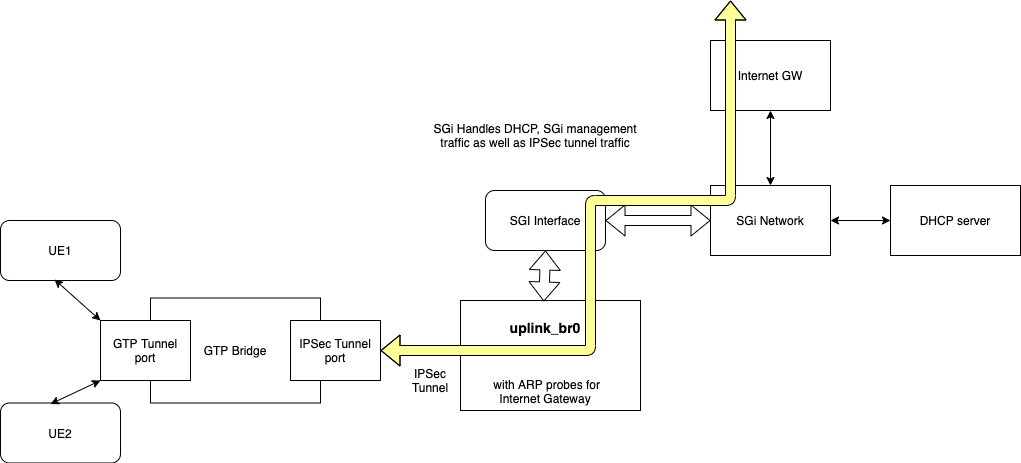
Scope of IPSec Tunnel
This is the scope for version 1.
- IPSec tunnel would support ‘self-signed certificate’ for Authentication
- There would be single tunnel port for all APNs
- VLAN configuration for APN would be ignored.
- Tunnel device would be L3 tunnel
- Uplink QoS would not work due to use of skb-mark, IPSec also utilizes skb-mark.
- IPSec would be only supported on ubuntu and kernel (> 4.14).
[1] https://www.wireguard.com/performance/
<https://core.ac.uk/download/pdf/322886318.pdf\>