Prerequisites
These are the prerequisites to setting up a full private LTE Magma deployment. Additional prerequisites for developers can be found in the developer's guide.
Operating System
Currently, the main development operating system (OS) is macOS. Documentation is mainly focused on that operating system.
To develop on a Linux OS, the package manager (brew for macOS) will need to be replaced by the appropriate package manager for the respective Linux distribution (e.g. apt, yum, etc.).
Windows OS is currently not supported as developing environment, due to some dependencies on Linux-only tools during setup, such as Ansible or fcntl. You can try to use a DevContainer setup though.
Development Tools
Development can occur from multiple OS's, where macOS and Ubuntu are explicitly supported, with additional polish for macOS.
Note: If you still want to contribute from a different OS, you will need to figure out some workarounds to install the tooling. You might want to follow one of the guides, either macOS or Ubuntu, and replicate the steps in your preferred OS.
macOS
-
Install the following tools
- Docker and Docker Compose
- Homebrew
- VirtualBox
- Vagrant
brew install go@1.13 pyenv
# NOTE: this assumes you're using zsh.
# See the above pyenv install instructions if using alternative shells.
echo 'export PATH="/usr/local/opt/go@1.13/bin:$PATH"' >> ~/.zshrc
echo 'eval "$(pyenv init --path)"' >> ~/.zprofile
echo 'eval "$(pyenv init -)"' >> ~/.zshrc
exec $SHELL
# IMPORTANT: close your terminal tab and open a new one before continuing
pyenv install 3.8.10
pyenv global 3.8.10
pip3 install ansible fabric3 jsonpickle requests PyYAML
vagrant plugin install vagrant-vbguestNote: In the case where installation of
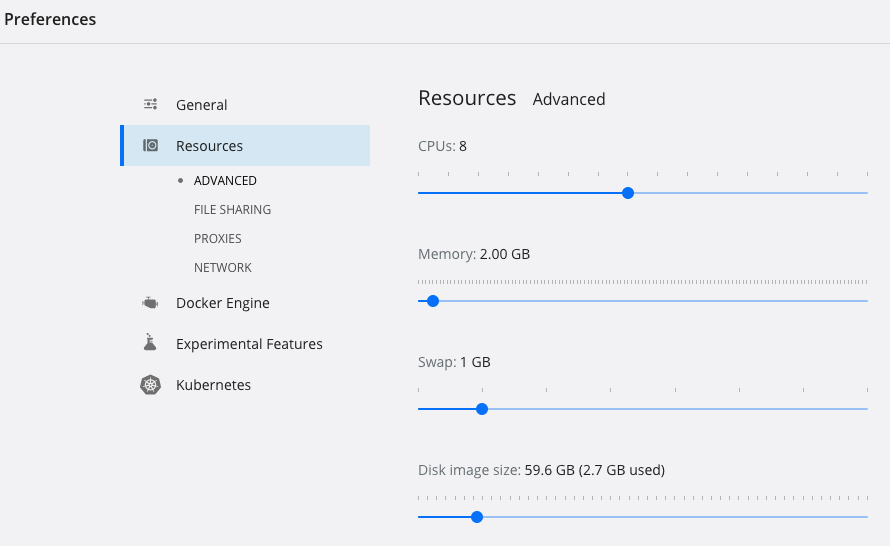
fabric3through pip was unsuccessful, try switching to other package installers. Try runningbrew install fabric.You should start Docker Desktop and increase the memory allocation for the Docker engine to at least 4GB (Preferences -> Resources -> Advanced). If you are running into build/test failures with Go that report "signal killed", you likely need to increase Docker's allocated resources.
Ubuntu
-
Install the following tools
-
Install golang version 13.
-
Download the tar file.
wget https://golang.org/dl/go1.13.15.linux-amd64.tar.gz -
Extract the archive you downloaded into
/usr/local, creating a Go tree in/usr/local/go.sudo rm -rf /usr/local/go && sudo tar -C /usr/local -xzf go1.13.15.linux-amd64.tar.gz -
Add
/usr/local/go/binto the PATH environment variable.export PATH=$PATH:/usr/local/go/bin -
Verify that you've installed Go by opening a command prompt and typing the following command
go versionYou should expect something like this
go version go1.13.15 linux/amd64
-
-
Install
pyenv.-
Update system packages.
sudo apt update -y -
Install some necessary dependencies. If you are using
zshinstead ofbash, replace.bashrcfor.zshrc.apt install -y make build-essential libssl-dev zlib1g-dev libbz2-dev libreadline-dev libsqlite3-dev wget curl llvm libncurses5-dev libncursesw5-dev xz-utils tk-dev libffi-dev liblzma-dev python-openssl git -
Clone
pyenvrepository.git clone https://github.com/pyenv/pyenv.git ~/.pyenv -
Configure
pyenv.echo 'export PYENV_ROOT="$HOME/.pyenv"' >> ~/.bashrc
echo 'export PATH="$PYENV_ROOT/bin:$PATH"' >> ~/.bashrc
echo -e 'if command -v pyenv 1>/dev/null 2>&1; then\n eval "$(pyenv init -) "\nfi' >> ~/.bashrc
exec "$SHELL" -
Create python virtual environment version 3.8.10.
pyenv install 3.8.10
pyenv global 3.8.10
-
-
Install
pip3and its dependencies.-
Install
pip3.sudo apt install python3-pip -
Install the following dependencies
pip3 install ansible fabric3 jsonpickle requests PyYAML
-
-
Install
vagrantnecessary plugin.vagrant plugin install vagrant-vbguest
Downloading Magma
You can find Magma code on Github.
To download Magma current version, or a specific release do the following
git clone https://github.com/magma/magma.git
cd magma

# in case you want to use a specific version of Magma (for example v1.6)
git checkout v1.6

# to list all available releases
git tag -l
Deployment Tooling
First, follow the previous section on developer tools. Then, install some additional prerequisite tools.
macOS
Install necessary dependencies and configure the aws cli
brew install aws-iam-authenticator kubectl helm terraform
python3 -m pip install awscli boto3
aws configure
Ubuntu
Install the following
-
awscli
sudo apt install awscli
Orchestrator and NMS
Orchestrator deployment depends on the following components
- AWS account
- Registered domain for Orchestrator endpoints
We recommend deploying the Orchestrator cloud component of Magma into AWS. Our open-source Terraform scripts target an AWS deployment environment, but if you are familiar with devops and are willing to roll your own, Orchestrator can run on any public/private cloud with a Kubernetes cluster available to use. The deployment documentation will assume an AWS deployment environment - if this is your first time using or deploying Orchestrator, we recommend that you follow this guide before attempting to deploy it elsewhere.
Provide the access key ID and secret key for an administrator user in AWS
(don't use the root user) when prompted by aws configure. Skip this step if
you will use something else for managing AWS credentials.
Production Hardware
Access Gateways
Access gateways (AGWs) can be deployed on to any AMD64 architecture machine which can support a Debian or Ubuntu 20.04 Linux installation. The basic system requirements for the AGW production hardware are
- 2+ physical Ethernet interfaces
- AMD64 dual-core processor around 2GHz clock speed or faster
- 4GB RAM
- 32GB or greater SSD storage
In addition, in order to build the AGW, you should have on hand
- A USB stick with 2GB+ capacity to load a Debian Stretch ISO
- Peripherals (keyboard, screen) for your production AGW box for use during provisioning
RAN Equipment
We currently have tested with the following EnodeB's
- Baicells Nova 233 TDD Outdoor
- Baicells Nova 243 TDD Outdoor
- Assorted Baicells indoor units (for lab deployments)
Support for other RAN hardware can be implemented inside the enodebd service
on the AGW, but we recommend starting with one of these EnodeBs.