Gateway Registration
Motivation
Previously, to register a gateway, the operator would have to gather the gateway information (both the hardware ID and the challenge key) through show_gateway_info.py script, then provision the gateway with the correct values of control_proxy.yml and rootCA.pem.
Then, the operator would have to register each gateway through the NMS UI and validate the gateway registration by running checkin_cli.py.
In efforts to simplify gateway registration, the new registration process only requires two steps: registering the gateway at Orc8r and then running register.py at the gateway.
Overview
The overview of gateway registration is as follows:
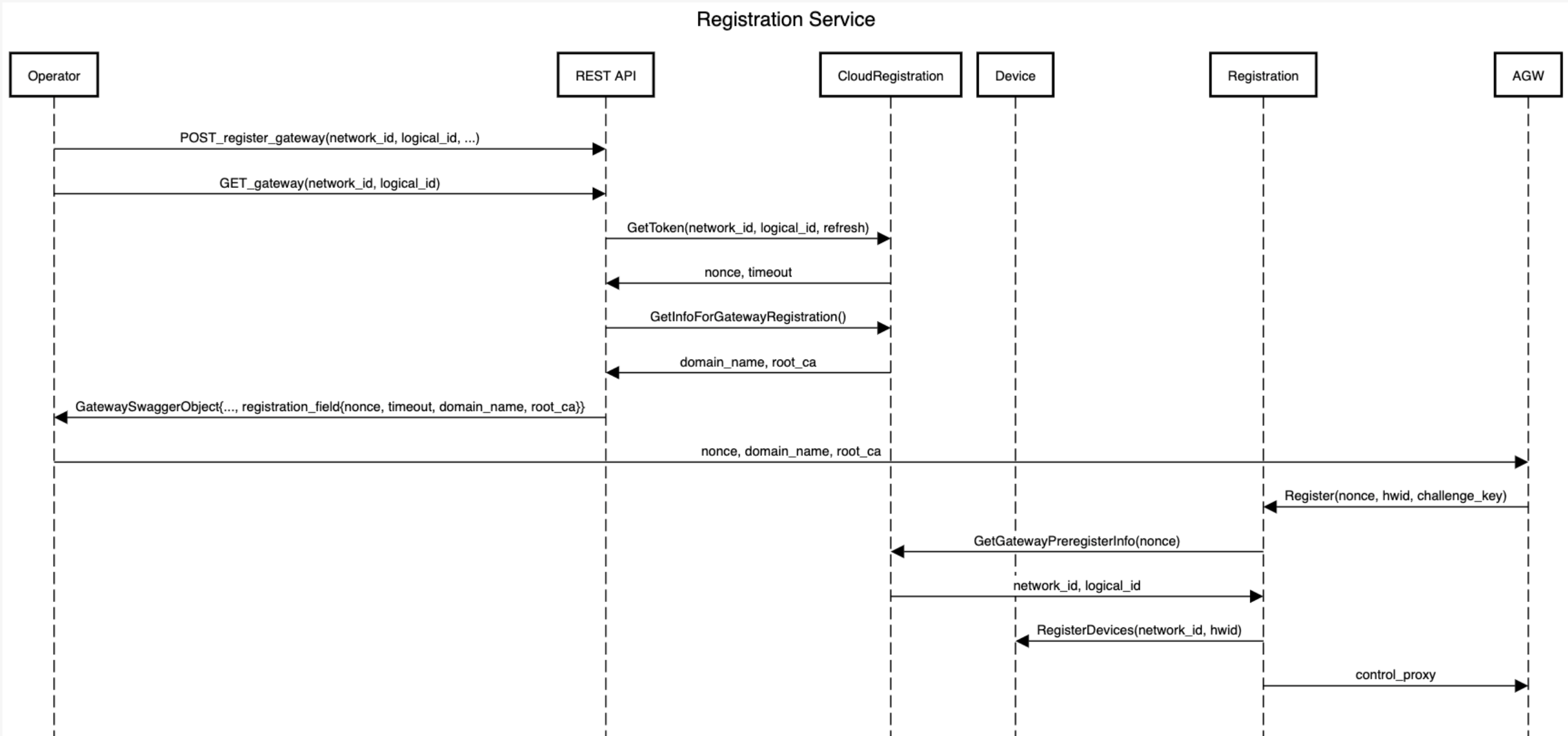
Note: The operator should set per-tenant default control_proxy.yml through the API endpoint \tenants\{tenant_id}\control_proxy as a prerequisite.
The control proxy must have \n characters as line breaks. Here is a sample request body:
{
   "control_proxy": "nghttpx_config_location: /var/tmp/nghttpx.conf\n\nrootca_cert: /var/opt/magma/certs/rootCA.pem\ngateway_cert: /var/opt/magma/certs/gateway.crt\ngateway_key: /var/opt/magma/certs/gateway.key\nlocal_port: 8443\ncloud_address: controller.magma.test\ncloud_port: 7443\n\nbootstrap_address: bootstrapper-controller.magma.test\nbootstrap_port: 7444\nproxy_cloud_connections: True\nallow_http_proxy: True"
}
-
The operator registers a gateway partially (i.e., without its device field) through Orc8r through an API call. It will receive a registration token, the
rootCA.pem, and its Orc8r's domain name in the response body under the field registration info. For example,{
"registration_info": {
"domain_name": "magma.test",
"registration_token": "reg_h9h2fhfUVuS9jZ8uVbhV3vC5AWX39I",
"root_ca": "-----BEGIN CERTIFICATE-----\nMIIDNTCCAh2gAwIBAgIUAX6gmuNG3v/vv7uZjL5sUKYflJ0wDQYJKoZIhvcNAQEL\nBQAwKTELMAkGA1UEBhMCVVMxGjAYBgNVBAMMEXJvb3RjYS5tYWdtYS50ZXN0MCAX\nDTIxMTAwMTIwMzYyOVoYDzMwMjEwMjAxMjAzNjI5WjApMQswCQYDVQQGEwJVUzEa\nMBgGA1UEAwwRcm9vdGNhLm1hZ21hLnRlc3QwggEiMA0GCSqGSIb3DQEBAQUAA4IB\nDwAwggEKAoIBAQDN6k/+7buO/KwgJgRjE/LM5wmNvMWpxDfKJpdpUH6DrjQkEpZB\n8E8Ts9qwR6RSTh8H/jL/qkoHpTbIdHZhOtayY/t/zreIClAytWyJSaJfGoRfXzsV\nyzjD7Bk79YrgAja9cAJcqy26gURQsB173opnlKTzMCfiirpY3gbiJEy74s0M6uII\njGvxx1uvXauFBO5mbbAPmxG4fFXTBGJMcxvHtdU8Vizf2YkZXqoXni0gJ0TJFK4O\nVeZe8EWuUXsD1iEbxz/H752I4yfQ2Djuj6emjRJlAeKnPsQWSsR4Qt3Po0R5YOmn\nEEsOmlfH6vOm3eiYrhxlIQ7uEFw760IDe0OLAgMBAAGjUzBRMB0GA1UdDgQWBBT6\nVQqTB+bVV7foz2xPo3sUfAqnhDAfBgNVHSMEGDAWgBT6VQqTB+bVV7foz2xPo3sU\nfAqnhDAPBgNVHRMBAf8EBTADAQH/MA0GCSqGSIb3DQEBCwUAA4IBAQASxJHc6JTk\n5iZJOBEXzl8iWqIO9K8z3y46Jtc9MA7DnYO5v6HvYE8WnFn/FRui/MLiOb1OAsVk\nJpNHRkJJMB1KxD5RkyfXTcIE+LSu/XUJQDc2F4RnZPYhPExK8tcmqHTDV78m+LHl\nswOIjhQVn9r6TncsfOhLs0YkqikHSJz1i4foJGFiOmM5R91KuOvwOG4qQ1Xw1J64\n7sHA4OElf/CIt0ul7xfAlzbLXOaPBb8z82dR5H28+3srGayPgauM9EGIHulm1J53\nM4uFtM9sA/X/EWMLF1T5ACDTjpD74yhxX98hFNlDuABacer/RN1UB/iTG7eMMhIO\nWLRlFB4QVm8w\n-----END CERTIFICATE-----\n"
}
}The registration token expires every 30 minutes and automatically refreshes every time the operator fetches this unregistered gateway.
-
The operator runs the
register.pyscript at the gateway with the registration token and its Orc8r's domain name.MAGMA-VM [/home/vagrant]$ sudo /home/vagrant/build/python/bin/python3 ~/magma/orc8r/gateway/python/scripts/register.py [-h] [--ca-file CA_FILE] [--cloud-port CLOUD_PORT] [--no-control-proxy] DOMAIN_NAME REGISTRATION_TOKENThe operator can optionally set the root CA file with the
--ca-file CA_FILEflag or disable writing to the control proxy file with the--no-control-proxyflag.sudopermission is necessary because the script needs write access to the file/var/opt/magma/configs/control_proxy.ymlfor configuring the gateway. For example, in a testing environment with therootCA.pemandcontrol_proxy.ymlconfigured, the operator could runMAGMA-VM [/home/vagrant]$ sudo /home/vagrant/build/python/bin/python3 ~/magma/orc8r/gateway/python/scripts/register.py magma.test reg_t5S4zjhD0tXRTmkYKQoN91FmWnQSK2 --cloud-port 7444 --no-control-proxyUpon success, the script will print the gateway information that was registered and run
checkin_cli.pyautomatically. Below is an example of the output of a successful register attempt.> Registered gateway
Hardware ID
-----------
id: "aabf4fb9-0933-4039-95a8-b87ae7144d71"
Challenge Key
-----------
key_type: SOFTWARE_ECDSA_SHA256
key: "MHYwEAYHKoZIzj0CAQYFK4EEACIDYgAEQrZVdmuZpvciEXdznTErWUelOcgdBwPKQfOZDL7Wkl8ALSBtKvJWDPyhS6rkW9/xJdgPD4QK3Jqc4Eox5NT6SVYYuHWLv7b28493rwFvuC2+YurmfYj+LZh9VBVTvlwk"
Control Proxy
-----------
nghttpx_config_location: /var/tmp/nghttpx.conf
rootca_cert: /var/opt/magma/certs/rootCA.pem
gateway_cert: /var/opt/magma/certs/gateway.crt
gateway_key: /var/opt/magma/certs/gateway.key
local_port: 8443
cloud_address: controller.magma.test
cloud_port: 7443
bootstrap_address: bootstrapper-controller.magma.test
bootstrap_port: 7444
proxy_cloud_connections: True
allow_http_proxy: True
> Waiting 60.0 seconds for next bootstrap
> Running checkin_cli
1. -- Testing TCP connection to controller.magma.test:7443 --
2. -- Testing Certificate --
3. -- Testing SSL --
4. -- Creating direct cloud checkin --
5. -- Creating proxy cloud checkin --
Success!